
Having a clear schedule of your daily activities is essential for being professional at anything you do and even to not end up missing some of your “To Do’s”. There are countless of ways for you to schedule everything you consider important, from physical paper and a pen to the more sophisticated options today’s advanced technology provides.
Google Calendar is one of the most popular tools people use to set an alert for not missing an event. That’s because people trust Google, the web tool is free of charge, and it delivers exactly what Google claims it will. Alerting you moments ahead of your planned task or event. That doesn’t mean the only place to go when needing a digital schedule is Google’s Calendar. While it really works, setting an alert over there is a bit complicated, a lot of steps to follow and it does not provide a listing of your schedule for you to see at any given time. You’ll have to tap on every colored date to view the scheduled event and that proves to be annoying.
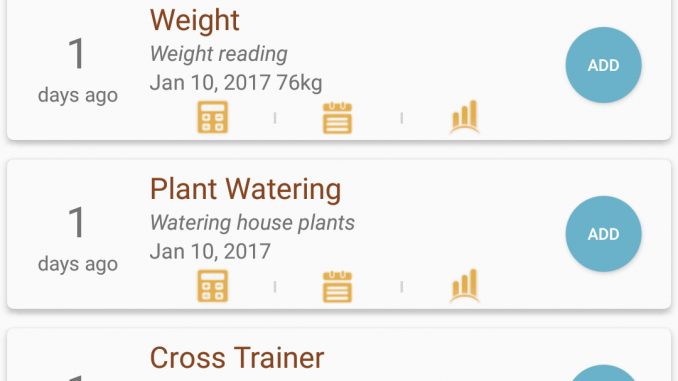
There are many other reasons that will make one look out for alternatives, but these are those I consider not being handy. You may probably have others. The best place to store your schedule is on your mobile phone, it always stays with you and chances of you missing it are scarce. Mobile phones have scheduling apps of their own, and one of those that provides an outstanding user support when it comes to scheduling events is the WhenDidI. While its name may have little to impress you, its features will certainly do.
This Android event tracker app comes with a clear and simple user interface, it doesn’t have over-complicated built-in tabs and everything you schedule appears on the main page. The app comes with a bunch of pre-loaded event categories such as Cross Trainer, Work Cycle, Haircut, Petrol, and Work Lunch. Each of these categories is specially designed to best serve your needs, for instance, the Petrol and Work Lunch have a pricing option to notify you ahead of it about how much this event will cost your wallet. This is the most impressive feature of this app in my opinion.
Nevertheless, you can adjust these pre-loaded categories or even add new ones. Myself, I added a movies category as to watch movies is a must for me. In addition, the app comes with public charts and measurements, allows you to back up your schedule on your phone, Dropbox, or Google account. Never miss your schedule. And something everyone will love about WhenDidI event tracker app is that it costs nothing to have it. It lists for free on Google Play Store (there’s a more advanced version of it if paying $1.60 is not something that bothers you).