If you’ve ever had a friend capture the perfect photo of you, only to realize it’s doomed to live forever in the secondary “Tagged” tab on your profile, Instagram has finally delivered the fix.
The platform has rolled out a feature allowing users to feature tagged posts directly alongside their main uploads on their primary grid. It eliminates the long-standing hassle of asking for original camera files or settling for pixelated screenshots just to keep your feed current.
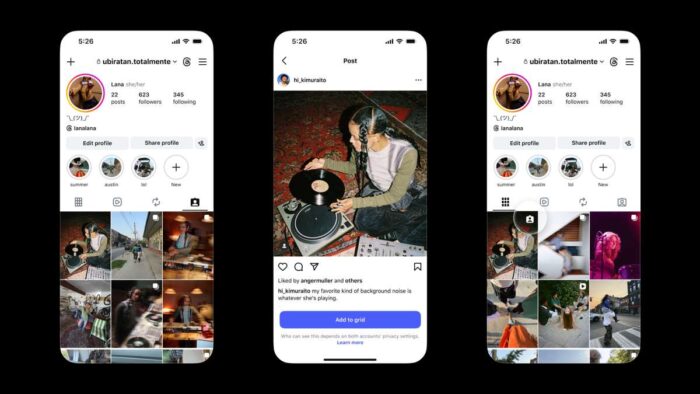
How to Add a Tagged Post to Your Main Grid
You can feature a post you’ve been tagged in through three different entry points:
- Directly from the post: Tap the three dots (
...) in the top-right corner of any post you’re tagged in, then select Add to your grid. - From the Tagged tab: Head to the Tagged section on your profile, select the photo, and choose Add to grid.
- From the initial notification: When someone tags you in a new post, you can add it directly to your main feed right from the activity alert.
If you ever change your aesthetic or want to clean up your feed, you can remove the post from your main grid at any point without losing the original tag or removing the photo from the tagged tab.
What Happens Behind the Scenes?
- Original credit stays intact: The post remains tied to the original creator’s account. Their handle stays prominently displayed at the top, ensuring proper credit and engagement metrics stay with the author.
- Privacy settings still apply: Posts displayed on your grid mirror the original poster’s privacy rules. If they go private or archive the original upload, it will automatically disappear from your grid as well.
- Clean resolution: You no longer need to compromise image quality by saving and re-uploading compressed photos.
The Verdict
Whether you’re showcasing professional photos from an event, featuring user-generated content for a business, or simply highlighting group trips without double-posting, this update gives users far greater control over their grid aesthetic without clogging up their camera roll.
